Cookies help us deliver the best experience on our website. By clicking Accept you are agreeing to the placement and use of cookies as described in our privacy policy.


Original publication date: 02/24/2026
Revisions noted: 04/02/2026
Gardyn is in your home, and we take that responsibility seriously. We’re sharing this update to keep you informed about a security issue which was identified and fixed. We worked with the U.S. Cybersecurity and Infrastructure Security Agency (CISA) as part of a coordinated vulnerability response.
As we work to reimagine the future of food at home, we hold ourselves to a high bar for product safety and security.
What happened
Several security vulnerabilities were identified by a third-party security researcher that affected certain components of the Gardyn Home and Gardyn Studio ecosystem.
These vulnerabilities were rated high severity based on their technical characteristics. While no exploitation has been observed, we treated them with urgency and remediated them prior to public disclosure.
What we know today
- No evidence of exploitation: Based on our investigation to date, we have no evidence that these vulnerabilities were exploited beyond what was reported by the security researcher.
- No payment card data involved: We do not store payment card information on Gardyn systems or applications.
- Fixes are available now: Updates have been deployed to Gardyn devices and included in the Gardyn mobile app. They are automatically installed when the Gardyn device is connected to the Internet.
- We will continue to monitor and review as part of our ongoing security program.
What was potentially possible before remediation
- Take remote control of a Gardyn device
- Access plant photos
- Access limited demographic information (for example: name, address, phone number, email address)
Again, we have no evidence of exploitation.
What you should do (this takes about 60 seconds)
1) Make sure your Gardyn is connected to the Internet
Fixes have been deployed to all Gardyn devices connected to the Internet and will be applied automatically as soon as a device comes back online.
If your device has been offline, it will receive updates as soon as it reconnects.
Simply check in the Gardyn mobile App that your device is connected.
If you can switch off/on the lights of your Gardyn from the mobile App, that means it is online.
If it is offline, it will clearly show on the home screen as shown below. Follow the instructions to bring it back online.
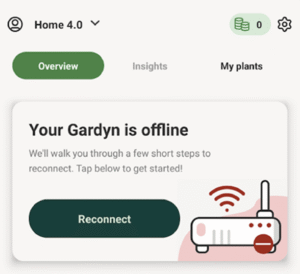
Note: These vulnerabilities did not present exposure for devices that were not connected to the Internet.
2) Confirm your device firmware is up to date
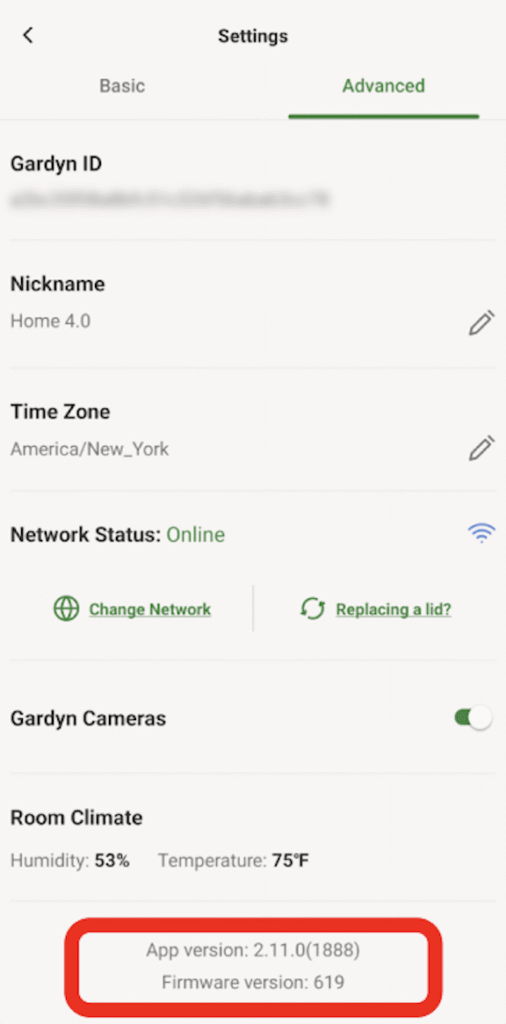
In the Gardyn Mobile App go to: Settings → Advanced. Firmware version 619 or later contains the necessary fixes.
3) Your Gardyn Mobile App will update automatically
Fixes are included in Gardyn mobile app version 2.11.0 or later. The App typically updates automatically when you open it. You can confirm that you have the right version in: Settings → Advanced.
What we did
- Remediated the identified issues and deployed fixes.
- Coordinated with CISA to ensure remediation was completed prior to public disclosure.
- Implemented additional safeguards and monitoring related to the affected components.
In addition, we have expanded our internal security testing and monitoring processes to further strengthen our development and deployment practices.
FAQ
- Why are you telling customers if there is no evidence that anything happened?
Because transparency matters. Vulnerability disclosures are sometimes published through a coordinated process, and we believe customers deserve clear information about what was found and what we did to address it.
- Was my device hacked?
We have no evidence that these vulnerabilities were exploited.
- Was my credit card or payment information exposed?
No. These vulnerabilities did not expose payment card information. We do not store payment card information on Gardyn systems or applications.
- What information could have been exposed if the vulnerabilities had been exploited?
Potentially plant photos and limited demographic information such as name, address, phone number, and email address.
- Do I need to do anything?
We recommend you confirm your device is online, your firmware is 619+, and your mobile app is 2.11.0+.
- How do I check my firmware and app versions?
In the Gardyn Mobile App: Settings → Advanced.
- I can’t find the Firmware for my Gardyn device in my app and the device is online. Does this mean my Gardyn might still be vulnerable?
If your Gardyn is online, it is very likely that it has already been automatically updated with the fixes.
You can check the Firmware version of your Gardyn in your Gardyn App in Settings -> Advanced. The version should be 619 or later.
- What if my Gardyn has been offline for a while?
Reconnect it to the Internet and leave it online so it can receive the automatic update.
- What should I do if I notice unusual behavior?
Please contact Gardyn Support through the app or the Gardyn Help Center and include the email on your account plus your device firmware version (Settings → Advanced). We will prioritize security-related reports.
- How do I contact Gardyn Support?
You can reach Gardyn Support using any of the options below:
-
- Email: [email protected]
- Phone: 844-4-GARDYN
- Live Chat: Use the Support Live Chat option (available through Gardyn’s support experience)
- Help Center
Tip: When contacting support about this security update, include the email address on your Gardyn account and your device firmware/app version (in the Gardyn Mobile App: Settings → Advanced) so the team can help you faster.
- What could have happened if they took control of my Gardyn device remotely?
They could have altered the lighting or watering of your plants for instance. We have no evidence that this happened.
- Was this a data breach?
No. Based on our investigation to date, we have no evidence that customer personal information was accessed, acquired, or misused as a result of these vulnerabilities.
- Were my home network and Wi-Fi password at risk of being exposed?
If a device had been fully compromised, certain local network configuration data stored on the device may have been viewable. We have no evidence this occurred. Out of an abundance of caution, customers who have concerns may reset their Wi-Fi password.
- Were my login credentials for the app at risk?
No, none of these vulnerabilities would have put your Gardyn App login credentials at risk. They are safe.
- What measures are being taken to monitor for potential new vulnerabilities?
We are working very closely with CISA (Cybersecurity Infrastructure and Security Agency) and we are testing all our systems to ensure the highest level of security.
We have expanded our internal security testing monitoring processes to further strengthen our development and deployment practices.
We do not store payment card information on Gardyn systems or applications.
Technical reference (CVE list) – CISA advisory notice
| Vulnerability ID | Description | Status |
| CVE-2025-29628 | An Azure IoT Hub connection string was downloaded over insecure HTTP, potentially enabling interception/modification (MITM) and possible device credential capture or device control. | Remediated |
| CVE-2025-29629 | Default weak credentials for SSH access could have enabled access to exposed devices. | Remediated |
| CVE-2025-29631 | The Gardyn Home Kit is vulnerable to command injection through vulnerable methods that do not sanitize input before passing content to the operating system for execution. The vulnerability may allow an attacker to execute arbitrary operating system commands on a target Home Kit. | Remediated |
| CVE-2025-1242 | Administrative credentials could be extracted via API responses, mobile app reverse engineering, or device firmware reverse engineering, potentially enabling administrative access to the IoT Hub. | Remediated |
| CVE-2025-10681 | Storage credentials are hardcoded in the mobile app and device firmware. These credentials do not adequately limit end user permissions and do not expire within a reasonable amount of time. This vulnerability may grant unauthorized access to production storage containers. | Remediated |
| CVE-2026-28766 | The /api/users endpoint exposes all user account information for registered Gardyn users without requiring authentication. | Remediated |
| CVE-2026-25197 | The /api/user/{id} endpoint allows authenticated users to pivot to other user profiles by modifying the id number in the API call. | Remediated |
| CVE-2026-32646 | The administrative endpoint /api/admin/devices is accessible without proper authentication, exposing device management functions. | Remediated |
| CVE-2026-28767 | The administrative endpoint /api/admin/notifications is accessible without proper authentication. | Remediated |
| CVE-2026-32662 | Development and test API endpoints are present that mirror production functionality. | Remediated |